Odoo comes with excellent financial reports right out of the box, to include Aged Receivable (to view the debts owed to you by your customers), Aged Payable (to see what you owe your vendors), the General Ledger, and the Balance Sheet. However, businesses in certain circumstances may require additional pieces of information. For example, inclusion of the terms of payment, production of a custom date, or balances in a foreign currency.
In this tutorial, you will learn how Odoo accounting reports customization works. This tutorial will cover:
- Adding new columns
- Updating existing rows
- Adding logic to the reporting engine
Understanding the Report Engine in Odoo:
Many of Odoo's financial reports (such as Aged Receivables, Trial Balance, or Balance Sheet) are not static reports at all. They are instead wrappers around an Odoo dynamic report engine which integrates Python, SQL, and XML.
Conceptually, the three main pieces work together to make reports:
Report Handlers (Python Models)
A report handler defines what data goes into a report.
Example: account.aged.partner.balance.report.handler prepares all the data needed for the Aged Partner Balance report.
Inside these handlers, you’ll usually find methods that:
Build SQL queries (_query_get)
Define periods, totals, and groupings (_aged_partner_report_custom_engine_common)
Structure results in dictionaries for display.
This is where we override logic to add new columns or modify rows.
Report Models (account.report):
A report in Odoo is represented by an account.report model.
It holds configuration, such as:
Report type and name (Balance Sheet, Aged Receivables, etc.)
Default columns and measures
Available filters (date ranges, journals, partners, etc.)
Reports are reusable in the UI or exportable (PDF, Excel).
Report Templates (XML/Qweb):
Once the handler provides data, the QWeb template controls how it’s displayed.
You can define columns, row, headers and layout in XML.
This layer is what the user sees in the Odoo frontend (PDF and excel exports).
Report Lines:
Each row in a report which is built from the handler’s result.
They are represented:
A partner (e.g., “John Doe”)
An account (e.g., “Receivables”)
A specific invoice (e.g., “INV/2025/0012”) Lines can also have children (expand/collapse in the UI).
Example: Customizing the Aged Partner Balance Report
Show amounts in the original transaction currency.
Add three columns: Payment Term, Invoice Date, and Expected Payment Date.
Step 1: Inherit the Report Handler:
We inherit the Odoo model, account.aged.partner.balance.report.handler:
    class AgedPartnerBalanceCustomHandler(models.AbstractModel):

    _inherit = 'account.aged.partner.balance.report.handler'
        ....
Step 2: Inherit the Query Logic
In the method _aged_partner_report_custom_engine_common that we inherited, we:
def _aged_partner_report_custom_engine_common(self, options, internal_type, current_groupby, next_groupby, offset=0, limit=None):
Define 6 aging periods (Not Due, 1–30 days, … 120+ days).
   periods = [
    (False, fields.Date.to_string(date_to)),
    (minus_days(date_to, 1), minus_days(date_to, 30)),
    (minus_days(date_to, 31), minus_days(date_to, 60)),
    (minus_days(date_to, 61), minus_days(date_to, 90)),
    (minus_days(date_to, 91), minus_days(date_to, 120)),
    (minus_days(date_to, 121), False),
]
Retrieve amounts from amount_currency rather than company currency.
Join invoice metadata such as invoice_payment_term_id and expected_pay_date.
This ensures the report buckets balances correctly while also fetching extra details.
Step 3: Add New Fields to the Result Dictionary
We extend the build_result_dict to include:
 def build_result_dict(report, query_res_lines):
 ...
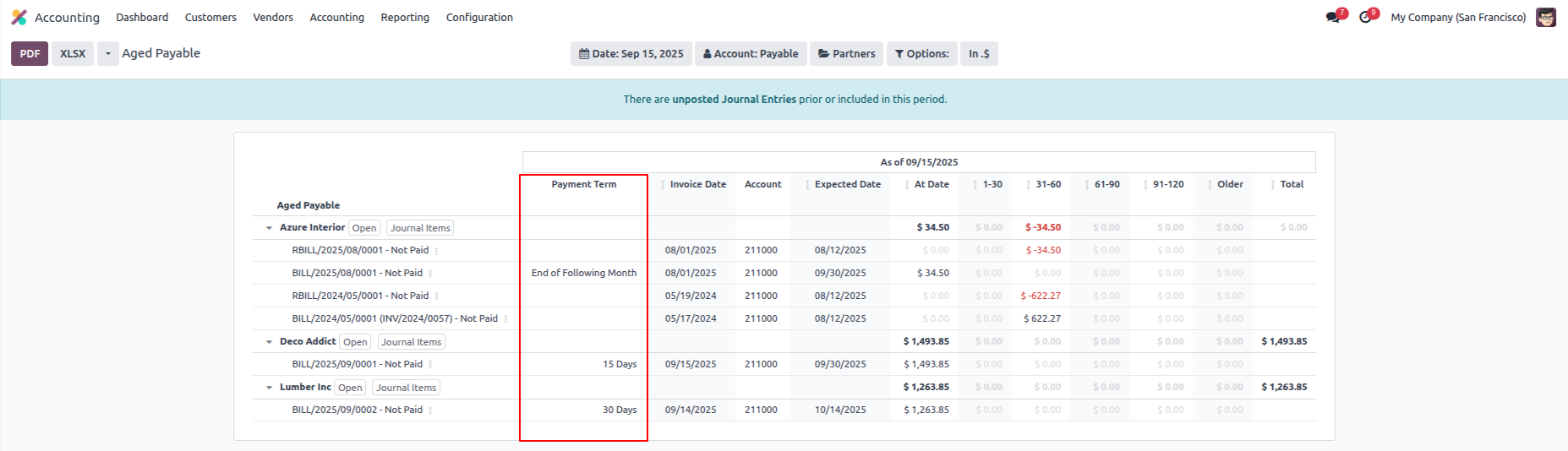
Payment Term (payment_term)
Invoice Date (invoice_date)
Due Date (due_date)
Expected Payment Date (expected_date)
Currency (original transaction currency)
This makes the report more actionable for collections and follow-ups.
Step 4: Update Partner Default Values
We override _prepare_partner_values so partner-level summaries also align with the new structure:
    def _prepare_partner_values(self):
    return {
        'invoice_date': None,
        'due_date': None,
        'amount_currency': None,
        'currency_id': None,
        'currency': None,
        'account_name': None,
        'expected_date': None,
        'total': 0,
        'payment_term': None,
    }
Step 5: Add Payment Term column in report:
Note: Do not forget to enable the Debug Mode to add customization in accounting reports.
Open the Aged Payable report and go to its settings.
Go to columns page and add the Payment Term column to visible it in Aged Payable report.
Do not forgot to add Expression Lable and Figure Type of that column.

Step 6: Add Lines for added column:
Now, go to the Lines page and select the report name. After that wizard will be opened.
Add Label, Computation Engine, Formula and Sub formula. All four are required fields.

Step 7: Impact of custom added column on Report:
Advantages of customizing Odoo acounting reports
This customization is used to:
View balances in the base currency with less ambiguity.
Easily find invoices with terms.
View overdue balances with due dates and expected payments.
Learn more about receivables and payables to help guide the financial decision-making process.
Conclusion
Odoo accounting reports customization is what gives companies the flexibility to shape their financial insights the way they need. Organizations can add new fields, extend the report handlers with additional logic, and modify the reporting engine logic to include vital information such as payment terms, invoice dates, expected payment dates, and original currency balances. These enhancements will allow for a better actionable report to follow-up on receivable and payable and for financial decision-makers to have better visibility into their financial reporting with context.