The decision to switch ERP systems is one of the biggest a company will ever take. Switching ERP systems is never just about transferring data. Rather, it means changing the way that your business processes information, makes reports and scales operations. NetSuite is a proprietary system that offers power but not much flexibility. On the other hand, Odoo offers modularity, openness, and growth. There are good reasons why companies are switching from NetSuite to Odoo and taking advantage of all, it can do.
In this guide, we look at what businesses need to consider when migrating from NetSuite to Odoo.
The Technical Approach: Why Scripted Migration Matters
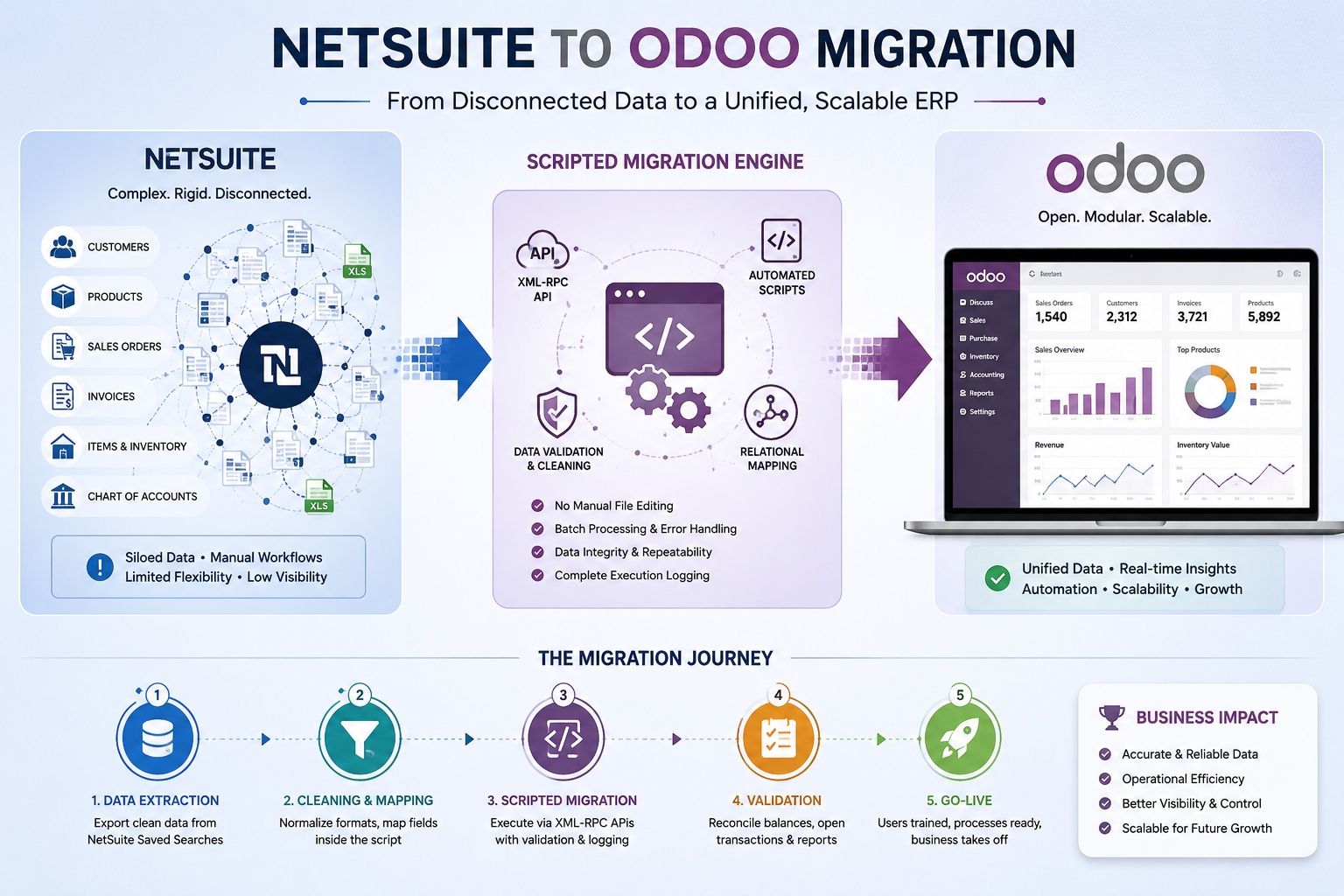
For such bulk migrations, manual CSV import methods will almost never work. They don’t support relational records, have no fault tolerance, and need a lot of pre-processing before use. However, using an automatic, script-based system, in particular, through the Odoo XML-RPC interface, provides solutions for all those issues, resulting in migration procedures which are consistent and can be reproduced whenever necessary.
The primary idea behind this is to completely eliminate any processing of the exported CSV files outside of the importing scripts. The logic of the file consumption should be fully implemented within the script, without renaming columns, editing the files in any way, etc.
This approach delivers several specific advantages:
- Data Integrity: The scripts can test duplication or missing mandatory fields before saving any data to the database, thus avoiding any further complications.
- Batch Processing: Big data from NetSuite can be processed in smaller batches, which helps to avoid any timeout issues while processing the data.
- Relational Mapping: XML-RPC makes it straightforward to resolve and link related records connecting a Sales Order to its Customer, or a Bill Line to its Purchase Order during the migration itself.
- Repeatability:Because scripts read NetSuite's native export format directly (headers, date formats, encoding included), the migration is fully repeatable. Running it again produces the same result.
A unified automated shipping ecosystem is essential for businesses looking to scale effectively while maintaining a high standard of customer experience.
Pre-Migration: Data Cleaning and Mapping
Before any script runs, the data from NetSuite must be mapped to Odoo's data model. This mapping work happens inside the script, not in the exported file itself. The exported file should never be manually edited.
- Saved Searches: Use NetSuite's Saved Searches to export clean, structured data. Always include internal IDs for every record to preserve relationships across entities.
- Field Mapping Inside the Script: The script must contain a complete field mapping dictionary that translates NetSuite's column names directly into Odoo field names. If a column name changes in a future export, only the dictionary needs to update.
- Format Normalization: Date formats, number formats, and address conventions differ between systems. All normalization must happen programmatically within the script.
- Automated Sanitization: Odoo's validation for countries, states, and email addresses is strict. Address and contact data must be cleansed automatically within the script, not manually corrected row by row in a spreadsheet.
Execution Logging: A Non-Negotiable Requirement
With thousands of entries moving from one location to another, errors will occur. The problem is whether or not you will be able to determine what happened, why it happened, and how to correct it.
- Row-level tracking: Any record creation or update activity needs to be recorded with the status of successful or unsuccessful, and the identifier of the record.
- Error classification: Errors need to be automatically classified into data errors (such as Missing Product Variant, Unknown Tax Code) and technical errors (API timeout, connection error) so that debugging can be efficient.
- Audit trail: The migration logs provide a permanent record trail for the process. The finance and logistics departments have to validate the migration, and the logs help them do so.
Migration Sequence: Which Entities to Prioritize
A migration must follow a dependency-aware sequence. You cannot migrate Sales Orders before Customers exist, or Bill Lines before Products are in place. The correct order is:
- Chart of Accounts (COA): Remap NetSuite's account types to Odoo's account taxonomy automatically within the script. This is the foundation everything else depends on.
- Contacts & Partners: Export customers, suppliers, and employees. The script should properly handle parent-child hierarchy by differentiating between a record of the Company and the related Contact Individual.
- Product Templates & Variants: NetSuite's "Matrix Items" must be interpreted and reconstructed as Odoo product templates with attribute/value pairs. This is one of the most complex mapping tasks in migration.
- Opening Balances: The journal entry script consumes NetSuite's trial balance export and generates corresponding Odoo opening entries with no interim spreadsheet manipulation.
- Open Transactions: Open invoices and purchase orders from NetSuite are migrated as draft documents in Odoo, preserving references and amounts.
Delta-Data Migration: Keeping Systems in Sync During Cutover
In most real-world ERP migrations, there will be some time frame between the first data migration and the actual Go-Live date for ERP migration projects. Throughout this time, business activities proceed on NetSuite, such as creating new customers, invoicing, inventory management, and order fulfillment. The delta-data migration is a strategy aimed at migrating only new or updated records from NetSuite to Odoo, without starting the migration process from scratch.
Why Delta Migration Matters
A one-time bulk migration is inadequate because by the time users have completed the user acceptance testing and approved the Go-Live process, the data in Odoo may become outdated. In addition, a team has no option but to either leave gaps in the data or start the migration process all over again.
Change Management and User Training
A perfect migration process may fail due to improper readiness of users of the new software application. Change management cannot be left for after the go-live; it should be done simultaneously with technical migration.
- Role-Specific Training: The finance department should be aware of Odoo's process of journal entries and reconciliations. The warehouse department should know the pick-pack-ship processes. General training for all topics is seldomly efficient.
- Process Documentation: It is recommended to develop quick-reference documentation related to the processes that each department executes in Odoo, and especially when these processes vary significantly from their NetSuite equivalents.
- User Acceptance Testing (UAT): Perform at least one full simulation within the staging environment involving order management, invoicing, payment reconciliation, and so on, prior to production. This allows uncovering many usability problems, which cannot be detected through data validation tests.
Technical Pitfalls and Post-Migration Validation
- Tax Engine Differences: The migration script needs to have a mapping table for tax codes from NetSuite into Odoo fiscal positions.
- Multi-Currency Handling: The script needs to read NetSuite currency fields without replacing the currency code manually in the file.
- Odoo.sh Environment: Utilize a staging branch for XML-RPC tests to validate the full pipeline from raw NetSuite export to committed Odoo records without affecting production.
- Trial Balance Reconciliation: Once the script has finished its execution, the Trial Balance in Odoo must match the NetSuite source to the cent.
Conclusion
Migrating from NetSuite to Odoo is an opportunity to streamline your business logic and eliminate redundant data. By utilizing XML-RPC scripts that are purpose-built to consume NetSuite's raw exports directly, you move from a fragmented manual process to a unified, automated migration ecosystem. No intermediate file editing, no column remapping; the script handles all transformation internally. While the technical lift is significant, the result is a highly scalable platform that empowers your team with real-time visibility and enhanced accuracy.
FAQ
Why do companies migrate from NetSuite to Odoo?
Companies often migrate to Odoo for greater flexibility, lower licensing costs, easier customization, and a modular ERP system that can scale with business growth. Odoo also offers stronger control over workflows, reporting, and integrations compared to many proprietary ERP systems.
What is the biggest challenge in a NetSuite-to-Odoo migration?
The biggest challenge is preserving data integrity while maintaining relationships between records such as customers, products, orders, invoices, and payments. A successful migration requires careful mapping of NetSuite data to Odoo's structure, along with thorough testing and validation to ensure business processes continue seamlessly after go-live.
Why is script-based migration better than manual CSV import?
Script-based migration automates data transformation, validation, and record linking, significantly reducing the risk of human error. Unlike manual CSV imports, scripts can handle complex relationships, process large datasets efficiently, provide detailed execution logs, and be rerun consistently whenever required.
What data can be migrated from NetSuite to Odoo?
Most business-critical data can be migrated, including chart of accounts, customers, vendors, contacts, products and variants, inventory balances, sales orders, purchase orders, invoices, vendor bills, payments, and historical financial records. The scope of migration can be tailored to the organization's operational and reporting requirements.
How do we verify that the migration was successful?
Migration success is verified through comprehensive reconciliation and testing. This typically includes matching trial balances between NetSuite and Odoo, validating record counts, reviewing sample transactions, reconciling inventory quantities and valuations, and performing end-to-end business process testing such as sales, purchasing, invoicing, and payment reconciliation.