Why Fixed Asset Management Matters
Fixed assets are long-term investments such as:
- Computers & IT equipment
- Vehicles
- Machinery
- Furniture
- Buildings
Unlike inventory, these assets provide value over multiple accounting periods and must be depreciated systematically.
What Is the Definition of Fixed Assets in Odoo?
Fixed assets refer to those resources that are tangible in nature and can be used to generate income over a longer period of time.
Common Examples
| Category | Examples |
| IT Equipment | Laptops, servers |
| Vehicles | Cars, delivery vans |
| Machinery | Manufacturing equipment |
| Furniture | Office desks, chairs |
| Buildings | Offices, warehouses |
Why Proper Asset Management Is Important
- Accurate Balance Sheet reporting
- Tax compliance
- Audit readiness
- Capital expenditure planning
- Insurance documentation
The Odoo software controls the asset right from its creation to its disposal.
Configuration in Odoo 19 (Step-by-Step)
Before creating assets, proper configuration is critical.
Step 1: Enable Asset Management
Go to:
Accounting -> Configuration -> Settings
Enable: Assets Management and click Save.
Step 2: Configure Asset Types (Categories)
Navigate to:
Accounting -> Configuration -> Asset Types
Each Asset Type defines:
- Asset account
- Depreciation account
- Expense account
- Depreciation method
- Duration
- Journal
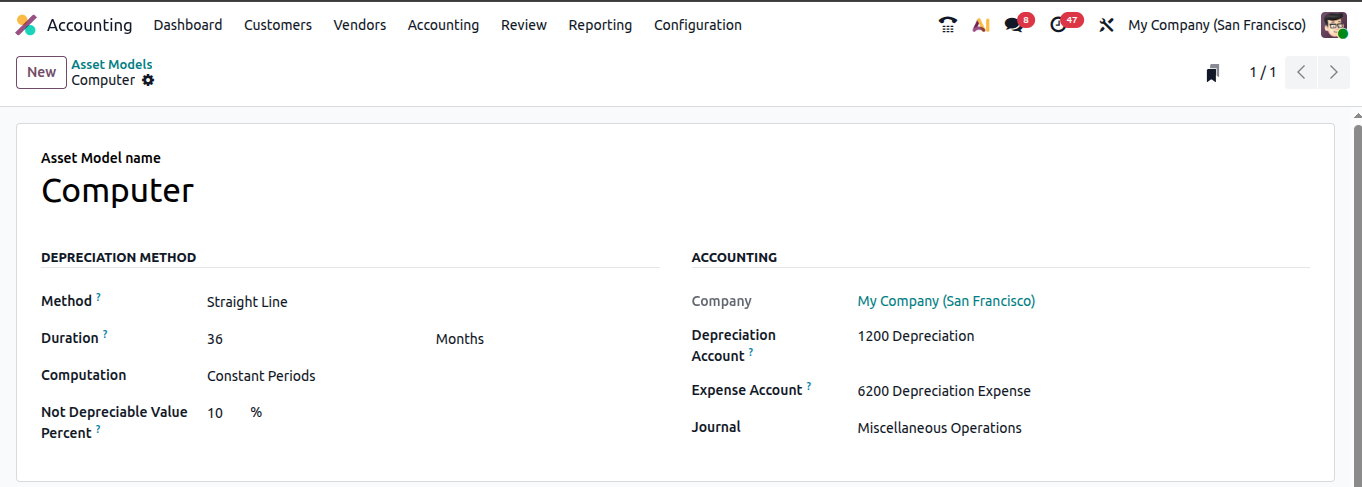
Example: Computer Equipment Asset Type
| Field | Example |
| Asset Model Name | Computer |
| Journal | Miscellaneous Expense |
| Expense Account | 6200 - Depreciation Expense |
| Method | Straight Line |
| Duration | 36 Months |
| Computation | Constant Periods |
| Not Depreciable Value Percent | Enabled |
Required Accounts
Ensure your Chart of Accounts includes:
- Asset Account (Balance Sheet)
- Accumulated Depreciation (Contra Asset)
- Depreciation Expense (P&L)
Depreciation Methods in Odoo 19
Odoo supports multiple methods to comply with accounting standards.
Linear (Straight-Line)
Most common method.

Formula: (Cost - Salvage Value) / Useful Life

Example: $12,000 asset over 4 years - $250/month

Best for furniture, buildings, computers.
Declining Balance
- Accelerated depreciation method.
- Higher depreciation in early years.
- Suitable for vehicles and technology.
Declining Then Linear
Hybrid method:
- Starts accelerated
- Switches to linear later
Prorata Temporis
If asset purchased mid-month:
- Depreciation calculated proportionally
- Recommended for accurate reporting.
Depreciation Schedule & Automation
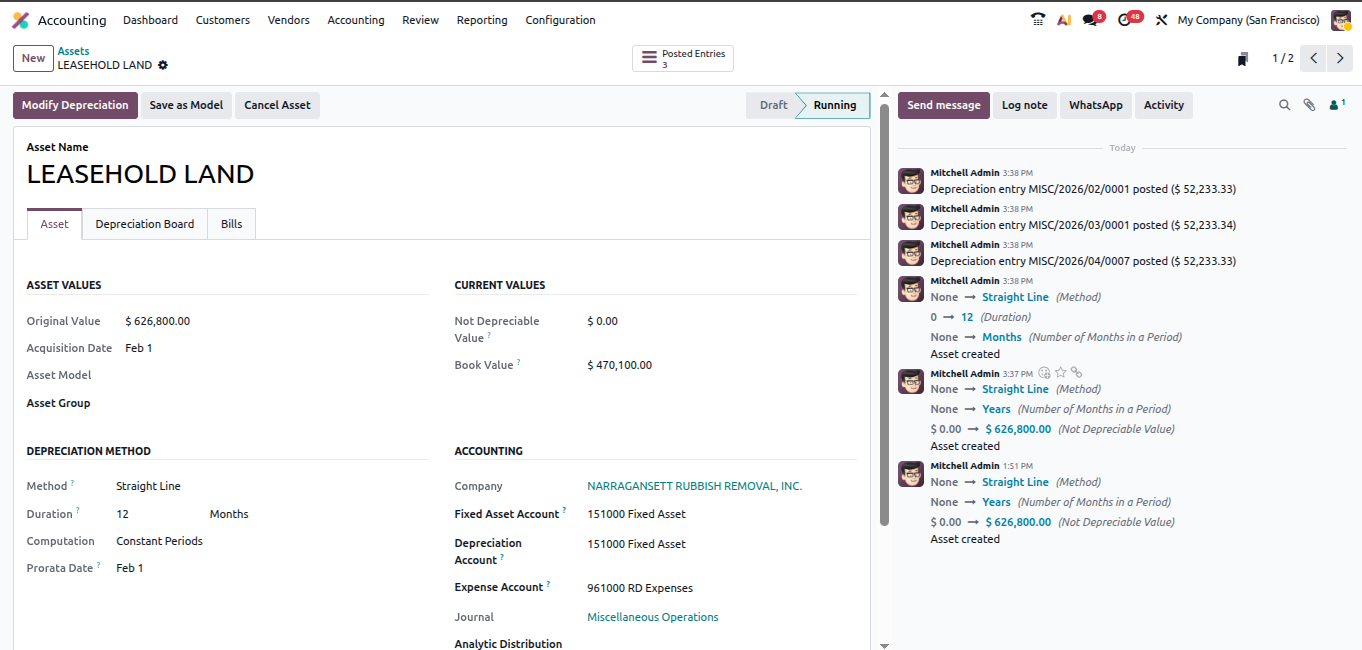
Once an asset is confirmed, Odoo automatically generates a Depreciation Board.
Navigate to:
Accounting -> Assets -> Depreciation Board
| Date | Depreciation | Book Value |
| Jan | $250 | $11,750 |
| Feb | $250 | $11,500 |
If Auto-post is enabled.
- Odoo posts entries automatically
- Journal entries link to asset
Financial Impact
- Income Statement - Depreciation Expense
- Balance Sheet - Reduced Net Book Value
Asset Tracking & Reporting
Asset Register
Go to:
Accounting -> Reporting -> Assets Report
View:
- Original Cost
- Accumulated Depreciation
- Current Book Value
- Status
Balance Sheet Integration
Automatically displays : Fixed Assets - Accumulated Depreciation = Net Book Value
Conclusion
Fixed Asset Management in Odoo 19 turns a complex accounting process into an automated, structured system.
Odoo when configured correctly can offer:
- Correct depreciation calculations
- Automated journal entries
- Real-time book value tracking
- Clean audit trails
- Proper gain/loss recognition on disposal
For most businesses implementing Odoo:
Start with Linear depreciation, enable Prorata Temporis, and automate monthly posting.
With the right setup, Odoo becomes a powerful financial control system for managing long-term assets.
FAQ
Can I change depreciation method later?
Not recommended. It affects posted entries. Consult your accountant before modifying.
How do I migrate old assets to Odoo?
Create assets manually and enter accumulated depreciation up to the go-live date.
What’s the difference between Delete and Dispose?
- Dispose = Proper accounting removal
- Delete = Removes draft record only
Can Odoo track asset location?
Yes, using tags, analytic accounts, or custom fields.
Does Odoo support automated depreciation?
Yes, enable Auto-post entries in the Asset Type configuration.