Why Inventory Valuation Matters in Odoo 19
In Odoo 19, Inventory is not just about stock tracking it directly impacts your financial reporting, profitability, and tax compliance.
The way you configure inventory valuation determines:
The Technical Approach: Why Scripted Migration Matters
For such bulk migrations, manual CSV import methods will almost never work. They don’t support relational records, have no fault tolerance, and need a lot of pre-processing before use. However, using an automatic, script-based system, in particular, through the Odoo XML-RPC interface, provides solutions for all those issues, resulting in migration procedures which are consistent and can be reproduced whenever necessary.
The primary idea behind this is to completely eliminate any processing of the exported CSV files outside of the importing scripts. The logic of the file consumption should be fully implemented within the script, without renaming columns, editing the files in any way, etc.
This approach delivers several specific advantages:
- Accuracy of your Balance Sheet
- Accurate cost of goods sold (COGS)
- Real-time profit margins
- Audit readiness
If configured incorrectly, your financial statements can be significantly distorted.
This guide explains:
- Average Costing (AVCO)
- Standard Costing
- FIFO (brief comparison)
- Step-by-step configuration in Odoo 19
Standard Valuation Methods in Odoo 19
- Manual (Periodic)
- Inventory value is not updated automatically in accounting when products are received, delivered, or transferred.
- Stock movements affect only the inventory records, not the accounting entries.
- The accounting team manually calculates and records inventory adjustments at the end of a period (monthly, quarterly, or yearly).
- Suitable for businesses with simpler inventory processes or those that prefer periodic stock valuation
- Automated (Perpetual)
- Inventory value is updated automatically in real time whenever stock moves.
- Odoo automatically creates accounting journal entries for receipts, deliveries, returns, and valuation changes.
- Provides up-to-date inventory valuation and cost of goods sold (COGS) information.
- Recommended for businesses that require accurate, real-time financial reporting and inventory tracking.
Standard Costing in Odoo 19
What is Standard Cost
Standard Cost assigns a fixed cost to a product, regardless of purchase price.
This cost is manually set by management based on:
- Budget
- Historical average
- Supplier contracts
Variance Accounting
If standard cost = $10
Actual purchase = $12
Qty = 100
Odoo posts:
| Account | Debit | Credit |
| Stock Valuation | $1,000 | |
| Price Difference | $200 | |
| Stock Input | | $1,200 |
The $200 is recorded as a variance, helping management track supplier performance
FIFO (First In, First Out) in Odoo 19
What is FIFO?
FIFO (First-In, First-Out) implies that the oldest goods in stock are the first ones to be sold out. As a result, the cost of goods sold (COGS) will be based on the cost of the oldest inventory, while the remaining goods will have a newer cost.
FIFO is best suited for:
- Items with expiration dates
- Inventory batches
- Companies that require inventory rotation
Example
If you sell 120 units:

COGS Calculation:

100 units × $5 = $500
20 units × $7 = $140

Total COGS = $640

Remaining Inventory:

30 units × $7 = $210
Average Costing (AVCO) in Odoo 19
What is AVCO
AVCO (Average Costing) calculates a weighted average cost each time new stock is received.
Formula:
New Avg Cost = (Existing Value + New Value) / (Existing Qty + New Qty)
Example
| Transaction | Qty | Cost | Stock Qty | Avg Cost |
| Purchase 1 | 100 | $5 | 100 | $5.00 |
| Purchase 2 | 50 | $7 | 150 | $5.67 |
Calculation:
(500 + 350) / 150 = 5.67
If the goods are sold 60 times, then COGS would be computed using the $5.67 per unit cost.
Step-by-Step Odoo 19 Configuration
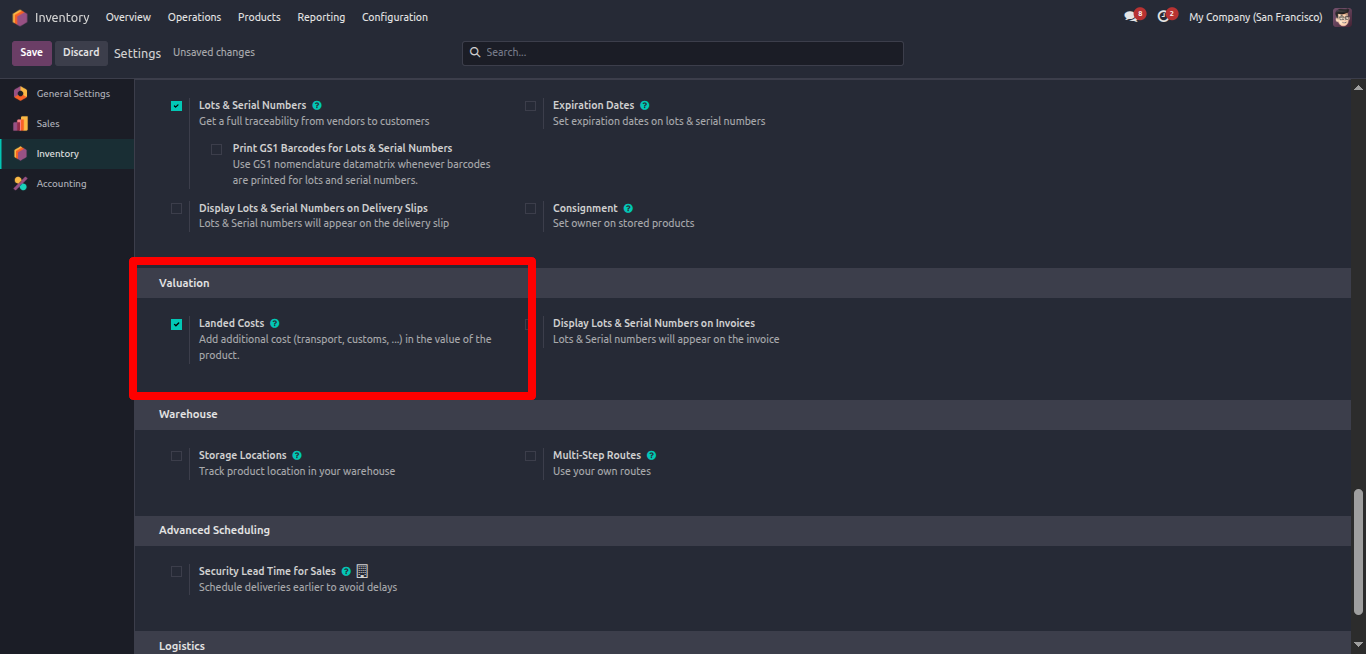
Step 1: Enable Settings
Go to:
Inventory -> Configuration -> Settings
Enable:
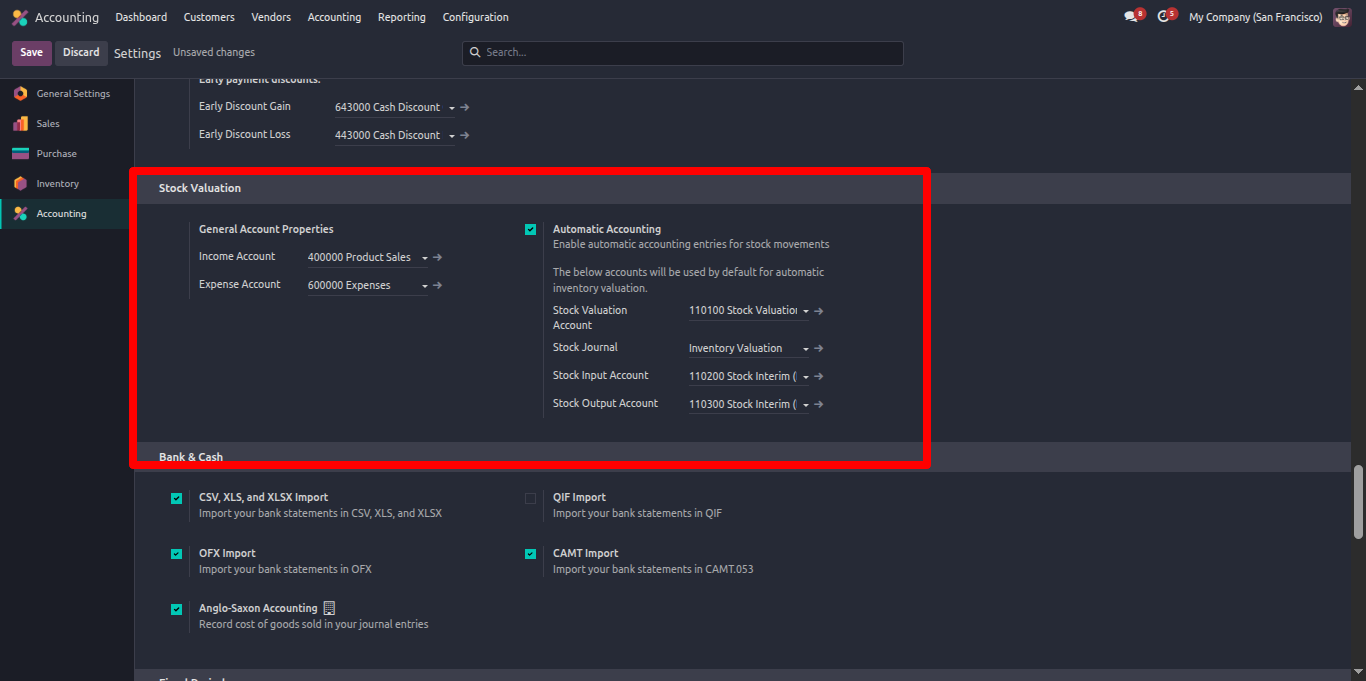
- Inventory Valuation (Automated)
- Landed Costs (if importing goods)
Step 2: Configure Product Category
Go to:
Inventory -> Configuration -> Product Categories
Set:
| Field | Value |
| Costing Methods | AVCO / Standard / FIFO |
| Inventory Valuation | Automated |
| Stock Valuation Account | Asset account |
Step 3: Assign Category to Products
Open Product
Select the configured Product Category.
Which Method Should You Choose?
| Business Type | Recommended Setup |
| SME / Trading | AVCO + Automated |
| Manufacturing | Standard + Automated |
| Retail Chain | AVCO |
| Perishables | FIFO |
| Import Business | AVCO + Landed Costs |
| Expiration Date | FEFO |
For most companies implementing Odoo 19 for the first time:
Start with AVCO + Automated Valuation.
It is simple, accurate, and aligns with real-time accounting.
Conclusion
Correct Odoo Inventory Configuration ensures:
- Accurate financial statements
- Real-time stock value visibility
- Clean audit trails
- Faster month-end closing
FAQ
Can I change costing method after going live?
Yes, but it will revalue all stock. Always consult your accountant first.
Does Standard Cost work with Manufacturing?
Yes. It is recommended for manufacturing environments.
How do I check if valuation matches accounting?
Compare: Inventory Valuation Report & Stock Valuation Account in General Ledger They should always match.
What is Landed Cost?
Additional expenses (freight, customs, insurance) added to product cost.
Is FIFO better than AVCO?
Depends on your business. FIFO is better for batch-specific tracking; AVCO is simpler for general trading.